
Standard email communication is not secure. Messages can be intercepted by unintended parties. Think of a standard email message as a postcard: readable by anyone who handles it along the way. Email messages can be secured with encryption.
When to encrypt
Use encrypted email any time your message contains:
Personally identifiable information (PII)
Financial or payment information
Employment records
Student records or academic data (FERPA-protected)
Health or medical information (HIPAA-protected)
Confidential institutional communications
How to send an encrypted email message in Outlook
Image
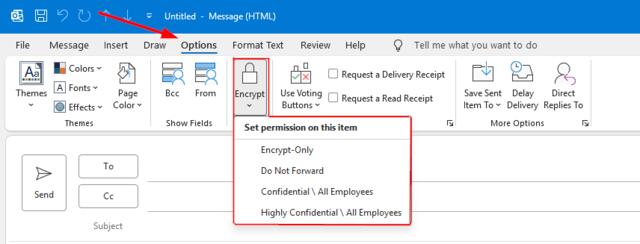
Click the "Options" tab in the message ribbon.
Select "Encrypt" to reveal the encryption options.
Choose the appropriate protection level:
Encrypt-Only: Protects the email while it is being sent and stored. Recipients can forward, print, copy, or save the message unless other restrictions are applied.
Do Not Forward: Protects the email and prevents recipients from forwarding, printing, or copying the contents. Intended for information that should remain with the original recipients only.
Confidential \ All Employees: Marks the message as confidential and limits access to employees within the organization. Suitable for internal business information that should not be shared externally.
Highly Confidential \ All Employees: Provides the highest level of internal protection. Intended for sensitive information such as personnel, financial, legal, or strategic information that should only be accessed by authorized employees.