
Image
Phishing is a form of social engineering and a scam where attackers deceive people into revealing sensitive information or sending money.
If someone you don't know requests private information or money, do not continue the conversation. Contact the organization directly and determine if any action is actually necessary.
If someone you don't know sends you an unexpected document (or a link to a document), do not download or open it. The document may contain malware that can steal your digital credentials or record your keystrokes.
If someone you know sends a message but asks you to reply to another email address or phone number, do not continue the conversation. Your acquaintance may already be exploited. The attacker is more successful if they can move you away from your organization's managed systems.
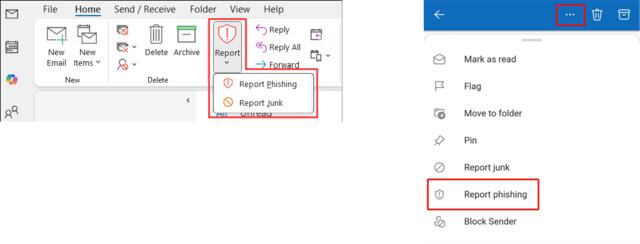
If you believe an email message is a phishing attempt, look for a red shield icon or the three-dot ellipsis to access the reporting function of Microsoft Outlook. This is the most efficient way to protect yourself and others from a phishing campaign.
If you have been tricked into sharing your password or other private information, please contact the IT department immediately.
Email: helpdesk@centralstate.edu
Phone: 937-376-6000
How vulnerable are you to a phishing attack? Take this short quiz to see if you know how to keep your accounts secure.